Try-Catch-Finally (TCF)
Try-Catch-Finally (TCF) Block
The Try-Catch-Finally (TCF) block is a powerful exception-handling mechanism in programming languages. An exception is an unexpected condition that can occur during the execution of code, disrupting the normal flow and potentially causing abnormal termination of the program. Exception handling allows the program to handle these unexpected conditions and ensure proper termination, preserving data, results, and the environment.
In Syncloop, you can use the TCF block to handle exceptions. There are two situations where TCF blocks are used:
Control flow in a Try-Catch clause or a Try-Catch-Finally clause:
Case 1: An exception occurs in the Try block and is handled in the Catch block.
Case 2: An exception occurs in the Try block but is not handled in the Catch block.
Case 3: No exception occurs in the Try block.
Try-Finally clause:
Case 1: An exception occurs in the Try block.
Case 2: No exception occurs in the Try block.
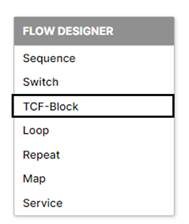
These blocks always come in pairs. To create a TCF block in Syncloop, right-click on the workspace and select the TCF block option.
Once the TCF block is selected, it will be created in the workspace.
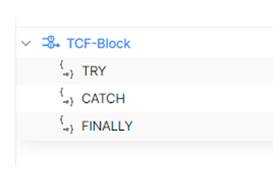
TCF Properties
It has three main properties:

Enabling Condition for Sub-Steps Evaluation
Try Block
The Try statement defines a code block where runtime errors are tested while it is being executed. Within the Try block, you can add various elements such as Sequence, Switch, another TCF block, Loop, Repeat, Map, and Invoke. All runtime errors raised within the Try block will be handled here.
To disable the Try block, right-click on the block and select Properties. In the properties dialog, set the status to disabled from the drop-down box. The entire block will be disabled, and the disabled caption will be visible on the block.
Catch Block
The Catch statement defines a code block that gets executed when a specified runtime error occurs in the Try block. Similar to the Try block, you can add elements like Sequence, Switch, another TCF block, Loop, Repeat, Map, and Invoke within the Catch block. It is responsible for catching and handling runtime errors.
To disable the Catch block, right-click on the block and select Properties. Set the status to disabled from the drop-down box. The entire block will be disabled, and the disabled caption will be visible.
Finally Block
The Finally block is executed every time, regardless of the result in the Try or Catch block. It is commonly used to perform cleanup operations or release resources. Within the Finally block, you can add elements like Sequence, Switch, another TCF block, Loop, Repeat, Map, and Invoke.
To disable the Finally block, right-click on the block and select Properties. Set the status to disabled from the drop-down box. The entire block will be disabled, and the disabled caption will be visible.
To gain a more in-depth understanding of the TCF block, you can watch the video below.