Switch
Switch Step
The Switch Step is a powerful feature in Syncloop that allows you to test a variable for equality against a list of values. It is similar to the switch statement found in object-oriented programming languages. This documentation will guide you on how to use the Switch Step effectively and provide information on its properties.
Switch Step Usage
The Switch Step is supported only in the API. When invoked, it will execute the cases, and the matched case will be executed accordingly. It is important to note that the switch case cannot execute alone without case steps. At least one case is required to perform the switch operation.
The Switch Step can be used anywhere in an API, and it also supports nested switch statements, allowing for more complex conditional flows.
Adding a Switch Step
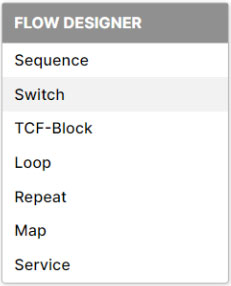
To add a Switch Step, simply right-click in the steps area, and a context menu will appear with the option to add a Switch Step. Refer to the image below for visual guidance.
Switch Step Properties
Status: This property allows you to enable or disable the switch case. By default, the switch will be in the enabled mode. If the status is set to disable for the switch and its child cases, further steps will not execute when the API is invoked, either through HTTP or another service.
Snapshots: You can create a runtime data state snapshot for the switch step. This can be useful for debugging and analyzing the data flow during execution.
Comment: You can add a comment on the switch step for better documentation and clarification.
Switch: In this property, you can specify the data or keywords to be used for executing the cases.
Constants: You can use different types of single constant values such as strings, integers, dates, numbers, and booleans. However, document, byte, and object types are not accepted.
Variable: You can use a variable of types such as strings, integers, dates, numbers, and booleans. The variable should be present only in the pipeline. Note that the variable cannot be resolved from local, package, or global properties.
Case
A switch step can only have cases as child steps, and it does not support other steps such as Map or Invoke as immediate children. However, inside each case, you can add other steps as needed. To add a case, right-click on the Switch Step as shown in the image.

Case Properties:
Status: Similar to the switch step, the case also has a status property that allows you to enable or disable the case. The default case is enabled. If a case is disabled, neither the case nor its child steps will execute when the API is invoked.
Snapshots: This property enables you to create a runtime data state snapshot for the case step. Snapshots are useful for capturing and analyzing data at different stages of execution.
Comment: You can add a comment to provide a description or any relevant details about the case step. Comments aid in understanding the logic and functionality of the API.
Case: You can provide the following data/keywords to execute:
Constants: Similar to the switch step, you can use different types of single constant values, such as strings, integers, dates, numbers, and booleans. However, document, byte, and object types are not accepted.
#default: This keyword functions similarly to the default statement in other programming languages. When none of the cases are matched, the default case will execute.
#null: In addition to the default keyword, Syncloop offers the #null keyword. This case executes when the variable is null, not assigned in the pipeline, or doesn't exist. The #null case is not mandatory, and it ensures that the flow of the service is not broken in the presence of null data.

To learn more about Syncloop Switch Cases, you can watch the video below: